

Every call, chat and task in Amazon Connect is steered by flows. A flow decides what the customer hears, what gets asked, which data gets looked up, where the contact is routed, and what happens when something fails. If your flows are messy, your contact center is messy: customers get stuck in loops, agents get the wrong context, and every change becomes risky.
This guide explains Amazon Connect contact flows from the ground up and then goes deep where architects and admins need it: all ten flow types, which flow runs when, the blocks you will use every day, contact attributes and JSONPath, Lambda integration, reusable flow modules, error handling, a worked callback example, and a troubleshooting checklist. Everything is based on AWS documentation, linked in the sources at the end. Note that AWS now calls the product Amazon Connect Customer; see our rename explainer if the names confuse you.
Quick answer: An Amazon Connect contact flow (called simply a flow in current AWS documentation) is a drag-and-drop sequence of blocks that controls the customer and agent experience. You build flows in the flow designer under Routing, then Flows. There are 10 flow types, and each type only offers the blocks relevant to its job. Flows store data in contact attributes, can call AWS Lambda (up to 8 seconds per call) and can reuse logic through flow modules.
Key takeaways
- Pick the right flow type first. You cannot import a flow of one type into another, so a wrong choice means starting over.
- Know the order flows run in: inbound, then customer queue, then agent whisper, then customer whisper. Defaults run if you do not set your own.
- Keep flows small and modular. Combine reusable modules into the end-to-end experience.
- Handle every error branch. Route it to a block that fixes the problem or ends the contact, and never create infinite loops.
- Protect sensitive data. Use the Set logging behavior block and temporary flow attributes.
What is a contact flow in Amazon Connect?
A flow is a visual workflow made of blocks linked by connectors. When a customer first enters your contact center, a flow can ask for input, play a prompt, check whether you are open, look up the customer in a CRM through Lambda, choose a queue and transfer the contact. AWS describes the flow designer as a drag-and-drop surface for linking blocks of actions together.
Two naming notes will save you confusion. First, older material says contact flows, and the API still uses that term (for example ListContactFlows), while current documentation says flows. Second, flows live in the admin console under Routing, then Flows. If you are new to the platform, start with our beginner’s guide to Amazon Connect and architecture guide first.
The 10 Amazon Connect flow types
When you create a flow you choose a type. Each type exposes only the blocks that make sense for that scenario, so the choice is not cosmetic. The table also shows the matching value you will see in the API and CLI.
| Flow type | API value | When to use | Channels |
|---|---|---|---|
| Inbound flow | CONTACT_FLOW |
The default type. First flow a contact reaches, typically attached to a phone number or chat entry point: greetings, menus, lookups, routing. | Voice, chat, tasks |
| Campaign flow | CAMPAIGN |
Controls what the customer experiences during an outbound campaign. | Outbound campaigns only |
| Customer queue flow | CUSTOMER_QUEUE |
What the customer experiences while waiting for an agent. Interruptible: play messages, loop prompts, offer a callback. | Voice, chat, tasks |
| Customer hold flow | CUSTOMER_HOLD |
What the customer hears while on hold. Often uses a Loop prompts block. | Voice |
| Customer whisper flow | CUSTOMER_WHISPER |
Plays to the customer just before they are joined to an agent, for example a recording notice. | Voice, chat |
| Outbound whisper flow | OUTBOUND_WHISPER |
Plays to the customer on an outbound call before connecting to the agent. Can enable call recording with the Set recording behavior block. | Voice, chat |
| Agent hold flow | AGENT_HOLD |
What the agent hears while the customer is on hold. | Voice |
| Agent whisper flow | AGENT_WHISPER |
Plays to the agent just before they are joined to the customer, for example queue or customer type. | Voice, chat, tasks |
| Transfer to agent flow | AGENT_TRANSFER |
Runs when an agent transfers to another agent through a quick connect. Plays messaging, then completes the transfer. | Voice, chat, tasks |
| Transfer to queue flow | QUEUE_TRANSFER |
Runs when an agent transfers to a queue through a quick connect. | Voice, chat, tasks |
Security warning: do not put sensitive information in a transfer to agent flow. On a cold transfer, the transferring agent disconnects before the transfer completes, and the flow runs on the caller, so the caller hears whatever it plays.
You can list flows of a given type from the command line, which is handy for audits:
aws connect list-contact-flows \
  --instance-id <your-instance-id> \
  --contact-flow-types CONTACT_FLOW CUSTOMER_QUEUE
The response includes each flow’s type, its state (ACTIVE or ARCHIVED) and its status (PUBLISHED or SAVED).
Which flow runs when? The journey of one call
A single call usually touches several flow types. For a simple inbound call, AWS documents this order: the inbound flow, then the customer queue flow while the caller waits, then the agent whisper flow, then the customer whisper flow. After both whispers finish, the agent and customer are connected.

A few rules from the documentation are worth memorizing:
- If you do not specify an agent whisper, customer whisper, customer queue or outbound whisper flow, the default flow of that type runs.
- The agent whisper runs first, then the customer is taken out of queue and hears the customer whisper. Both finish before the two can talk.
- If the agent disconnects during the agent whisper, the customer stays in the queue to be re-routed. If the customer disconnects during the customer whisper, the contact ends.
- You can play at most one agent whisper and one customer whisper. If you use several Set whisper flow blocks, the most recent one for each type wins, and a single block sets either the customer or the agent whisper, not both.
- Chat has no default whisper. Add a Set whisper flow block to play one.
Contact initiation methods
The flows that run depend on how the contact started. AWS lists ten initiation methods, and you can read the value in the system attribute $.InitiationMethod inside a flow.
| Initiation method | What it means |
|---|---|
INBOUND |
The customer contacted you, for example by calling your number. |
OUTBOUND |
An agent or system placed an outbound contact from Amazon Connect. |
TRANSFER |
An agent transferred the contact to another agent or queue (quick connect). |
CALLBACK |
A queued callback is being made to the customer. |
API |
The contact was created through an API, such as an outbound voice contact queued to an agent. |
QUEUE_TRANSFER |
A flow block moved the contact from one queue to another. |
DISCONNECT, WEBRTC_API, EXTERNAL_OUTBOUND, MONITOR |
Less common methods, including in-app web calling and monitoring. See the AWS documentation for the flows each one runs. |
How to build a flow in the flow designer
- In the admin console choose Routing, then Flows, then Create flow. This creates an inbound flow. Use the drop-down arrow on the button to pick another type.
- Name the flow and add a description.
- Search for a block or expand a group, then drag blocks onto the canvas. Blocks do not have to be placed in a strict line.
- Select a block’s title to configure it in the side pane, then choose Save to close the pane.
- Drag from each block’s outcome circle (Success, Error, a menu option) to the next block.
- Choose Save to store a draft, or Publish to activate it immediately.
Every connector must be connected to a block before the flow will publish. AWS also gives you helpful extras: a mini-map for navigating large flows, undo and redo, comments on blocks, copy and paste, custom block names, resource tags on flows and modules, and archive, delete and restore.
Naming convention first. You will create tens or hundreds of flows, so agree a naming convention up front. AWS strongly recommends against renaming flows after you start. A pattern such asIN_Main_Sales_v1,CQ_Standard_CallbackandAW_Priority_Customer(type prefix, purpose, version) keeps things sortable.
The blocks you will use every day
There are many blocks, and which ones appear depends on the flow type. These are the workhorses of a typical inbound design:
| Block | What it does | Practical tip |
|---|---|---|
| Set logging behavior | Turns flow logging on or off for parts of a flow. | Turn it off where you collect sensitive data that must not reach CloudWatch. |
| Set voice | Sets the voice and language used for text-to-speech and Amazon Lex V2 bots. | The language must match the language model of your Lex V2 bot. |
| Set recording behavior | Controls call recording for the contact. | See our screen recording guide for the related setup. |
| Check hours of operation | Branches on whether you are open. | Use it before transferring to a queue. |
| Check staffing | Branches on whether agents are available to take the contact. | Use it together with hours of operation. |
| Check queue status | Branches on queue conditions, such as capacity. | Powers callback offers when queues are busy. |
| Get customer input / Store customer input | Plays a prompt and captures a keypress or spoken input. | Store input in a user-defined attribute, not a system attribute. |
| Play prompt / Loop prompts | Plays audio or text to speech. Loop prompts repeats prompts and can interrupt with options. | Ideal in queue and hold flows. |
| Set working queue / Transfer to queue | Chooses the queue, then places the contact in it or in a callback queue. | Always check hours and staffing first. |
| Set callback number | Sets the number used to call the customer back. | Use the system Customer Number or a number you collected. |
| Set whisper flow | Chooses the agent or customer whisper flow to play. | One block sets one whisper type. |
| Set contact attributes / Check contact attributes | Stores values and branches on them. | The backbone of personalization and routing. |
| Customer profiles | Retrieves, creates or updates a customer profile. | Requires Customer Profiles to be enabled on the instance. |
| AWS Lambda function / Invoke module | Calls your code or a reusable flow module. | See the Lambda and modules sections below. |
Contact attributes and JSONPath
Contact attributes are key-value pairs about a contact. You write them with Set contact attributes and read them with other blocks, in Lambda functions, in flow modules and in contact records. For example, a block can set the user-defined attribute greetingPlayed to true so later blocks know the greeting already ran.
Attribute types
| Type | What it is | Example reference |
|---|---|---|
| User-defined | Values you create in flows or pass in from outside. | $.Attributes.greetingPlayed |
| System | Predefined by Amazon Connect. You can reference them but not create them. | $.Channel, $.InitiationMethod, $.InstanceARN |
| External | Values returned by a Lambda function. | $.External.AttributeKey |
| Amazon Lex | Data from a Lex bot, such as intent and slots. | $.Lex.IntentName, $.Lex.Slots.slotName |
| Customer profile | Fields from a customer profile block. | $.Customer.City |
| Segment | System values stored on a contact segment, such as the channel subtype. | connect:Subtype |
| Flow | Temporary variables that exist only inside the flow. | Not visible outside the flow |
Use flow attributes for sensitive data. Flow attributes are not persisted on the contact, not even when it is transferred to another flow. That makes them suitable for something like a card number used in a Lambda data dip. User-defined attributes are included in contact records.
Rules that prevent bugs
- Use consistent camelCase names such as
customerTieracross all AWS services. - Avoid spaces and special characters in names. They can break downstream reporting such as AWS Glue crawlers. If you must reference a name with spaces, use brackets and single quotes, for example
$.Attributes.['user attribute name']. - In a user-defined destination key, never use
$or., because they are used by JSONPath. - When setting User Defined or External values in dynamic attribute fields, use only alphanumeric characters and periods.
- If you see a stray period at the start of an attribute name, you probably used JSONPath (
$.) while also selecting a variable type from the drop-down. Use one or the other. - Within the same namespace, such as a system attribute, use the attribute name. For a different namespace, such as an external attribute, use the full JSONPath.
Calling AWS Lambda from a flow
Lambda is how flows reach CRMs, databases and APIs. The AWS Lambda function block invokes your function, passes it the flow run data and any parameters you define, and returns values you can use later. Key facts from the AWS API reference:
- Time limit: the number of seconds to wait for a response, a whole number from 1 to 8, set statically.
- Invocation type:
SYNCHRONOUSorASYNCHRONOUS. - Response type:
STRING_MAP(a flat object of string key-value pairs) orJSON(any valid JSON, including nested). - Results: returned attributes are available under
$.External.
Here is a minimal Python example that looks up a caller and returns attributes the flow can route on. It is an illustration, so replace the lookup with your own CRM or database call.
def lambda_handler(event, context):
    # The caller's number, from the flow's contact data
    caller = event["Details"]["ContactData"]["CustomerEndpoint"]["Address"]
    # Parameters you defined on the Lambda block in the flow
    params = event["Details"]["Parameters"]

    # TODO: replace with a real lookup (CRM, DynamoDB, API)
    customer = {"name": "Asha", "tier": "gold"}

    # STRING_MAP response: flat key-value pairs, values must be strings
    return {
        "customerName": customer["name"],
        "customerTier": customer["tier"],
    }
In the flow, add a Check contact attributes block that reads $.External.customerTier and routes gold customers to a priority queue. For more Lambda scenarios, see our Top 100 Amazon Connect developer interview questions.
Do not make callers wait in silence. A synchronous call holds the flow for up to 8 seconds. Keep lookups fast, add a prompt or message before slow steps, and use asynchronous invocation or a callback or SMS pattern for long processes.
Flow modules: build once, reuse everywhere
Flow modules are reusable blocks of flow logic that you invoke from other flows with an Invoke module block. They are the best way to follow AWS’s advice to keep flows as small as possible and combine them into an end-to-end experience. Recent capabilities make them much more powerful:
- Custom inputs, outputs and branches (announced November 24, 2025). For example, an authentication module can accept a phone number and PIN and return the customer name and an authenticated or not authenticated branch.
- Versions and aliases. Create immutable version snapshots and map aliases such as production or staging to specific versions. When you move an alias to a new version, every flow using it picks up the update automatically.
- Nesting up to five levels deep and invocation from all flow types, as documented in an AWS Contact Center blog post.
Good module candidates: caller authentication, business-hours checks, standard closing messages, callback offers and language selection.
Worked example: an inbound flow with a callback
This pattern follows AWS’s own best practices and works for most voice contact centers. The diagram shows the logic, and the steps below explain it.
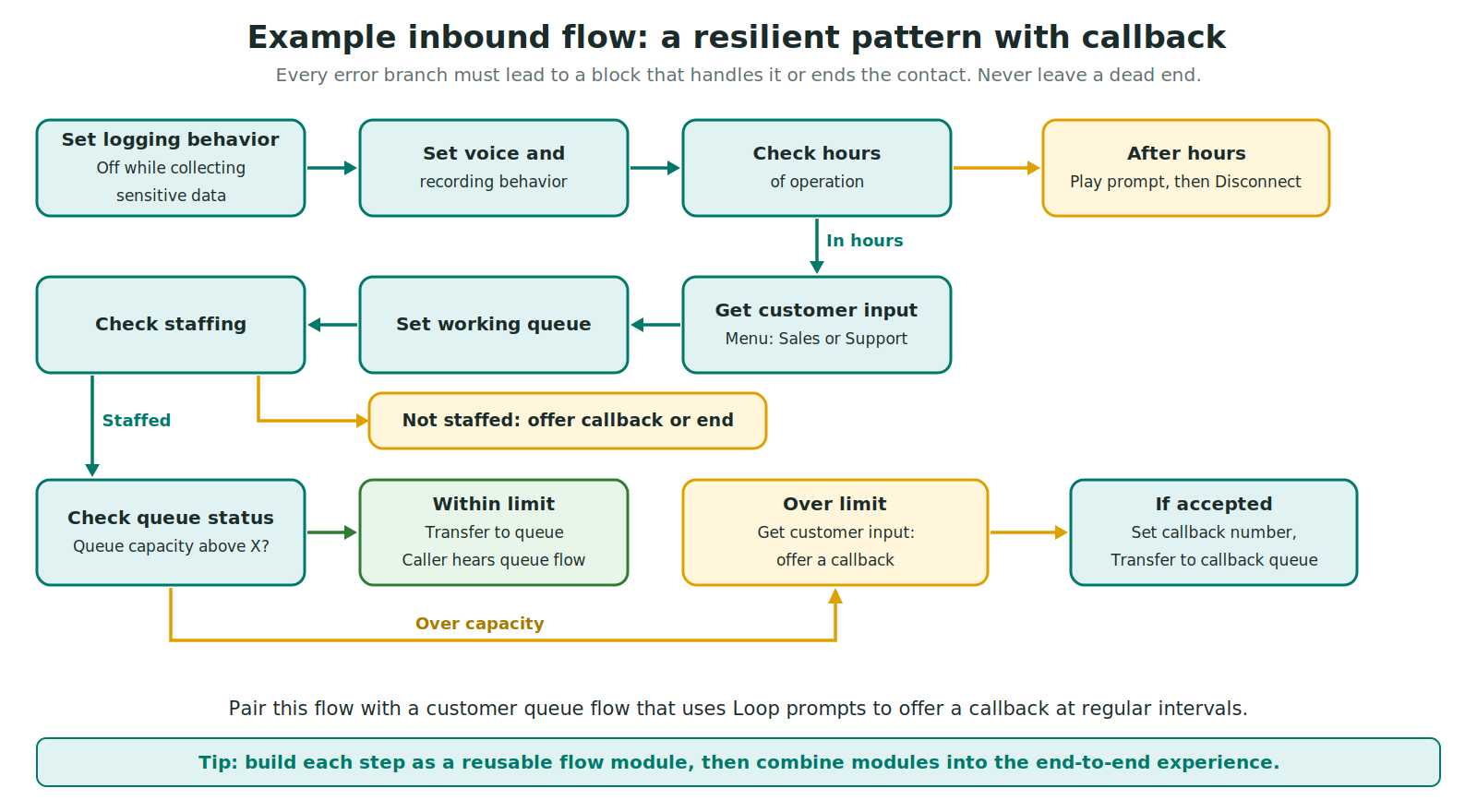
- Set logging behavior so logging is on, and off for any step that collects sensitive data.
- Set voice and Set recording behavior to match your language and compliance needs.
- Check hours of operation. If closed, play a message and disconnect.
- Get customer input for a simple menu such as Sales or Support, and store the choice in a user-defined attribute.
- Set working queue based on the choice.
- Check staffing. If nobody is staffed, offer a callback or end gracefully.
- Check queue status with a condition on queue capacity. If capacity is above your threshold, use Get customer input to offer a callback, which keeps the caller’s place in line.
- If accepted, Set callback number (the system Customer Number or a number you collected), then Transfer to queue configured as a callback queue. Otherwise, Transfer to queue normally.
- In the customer queue flow, use a Loop prompts block to repeat messages and offer the callback again at regular intervals.
Error handling and best practices
AWS’s published flow best practices boil down to these rules:
- Route every error branch to a block that handles the error or ends the contact. An unconnected error is a dead call.
- No infinite loops. Every contact must reach an agent, a bot or an external transfer.
- Check hours of operation and staffing before putting a contact in a queue.
- Offer callbacks before and after the queue transfer by using Check queue status.
- Use E.164 numbers for external transfers, dropping the national trunk prefix. A UK mobile written 07911 123456 becomes +44 7911 123456.
- Add every country used in external transfers or outbound dialing to your account’s service quota.
- Be modular. Small flows and modules mean fewer regression tests.
Testing, logging and rollback
- Save versus Publish. Save keeps a draft. Publish makes the flow live right away, so test in a non-production instance or with a test number first.
- Flow logs. After a flow is published, flow logs help you analyze it and find the errors customers hit. Use Set logging behavior to exclude sensitive segments.
- Version control. If a change causes problems, you can roll back a flow to a previous version.
- Tags. Tag flows and modules so you can organize them and apply tag-based access control.
Common mistakes and how to fix them
| Mistake | Result | Fix |
|---|---|---|
| Created the wrong flow type | Needed blocks are missing, and you cannot import across types | Rebuild in the right type. Decide the type before you start. |
| Unconnected error branches | Calls drop or hang | Route every error to handling logic or a disconnect. |
| Attribute reference starts with a stray period | Lookups return nothing | Use either JSONPath or the variable-type picker, not both. |
| Spaces or symbols in attribute names | Broken reporting and tricky references | Use camelCase names with letters and numbers. |
| Slow Lambda in the main path | Silence, then error | Keep calls under the 8-second limit, use async or callbacks for slow work. |
| Sensitive data in logs | Compliance risk | Use Set logging behavior and flow attributes. |
| No hours or staffing check | Callers queue when no one can answer | Check hours and staffing before the queue transfer. |
Flows in the age of AI agents
AI is changing what happens inside a contact, but flows still orchestrate the journey: routing, queues, data lookups and handoffs. AWS’s agentic CX designer, generally available since September 2, 2026, is a separate no-code canvas for designing AI-powered self-service experiences, and it works alongside flows rather than replacing them. Expect more of your contact center logic to be a blend of deterministic flow steps and AI-driven conversation. For more on what changed this year, read our Amazon Connect vs Amazon Connect Customer guide.
Interview questions on flows (with hints)
| Question | What a strong answer covers |
|---|---|
| Name the flow types and when each runs. | The 10 types, and the order inbound, customer queue, agent whisper, customer whisper. |
| How would you offer a callback when queues are long? | Check queue status with a capacity condition, Get customer input, Set callback number, Transfer to callback queue. |
| How do you pass data from a CRM into a flow? | Lambda block, response in $.External, optionally copied to user-defined attributes. |
| How do you keep sensitive data out of logs? | Set logging behavior, flow attributes, avoiding user-defined attributes for secrets. |
| How do you keep flows maintainable? | Naming conventions, flow modules with versions and aliases, small flows, rollback. |
Practice more in our Top 50 Amazon Connect interview questions and outbound campaign interview questions, and test yourself with the free Amazon Connect voice quiz and chat quiz.
Frequently asked questions
What is a contact flow in Amazon Connect?
A contact flow is a visual set of connected blocks that defines what a customer or agent experiences in your contact center, from the first greeting to routing, queue handling and disconnect. The current AWS documentation simply calls them flows. You build them in the flow designer under Routing, then Flows.
Are “contact flows” and “flows” the same thing?
Yes. AWS documentation for Amazon Connect Customer now uses the word flows, while older tutorials, the API names (such as ListContactFlows) and many job descriptions still say contact flows. They refer to the same thing.
How many flow types does Amazon Connect have?
Ten: inbound flow, campaign flow, customer queue flow, customer hold flow, customer whisper flow, outbound whisper flow, agent hold flow, agent whisper flow, transfer to agent flow and transfer to queue flow. Each type offers only the blocks that make sense for its scenario.
What is the difference between an agent whisper flow and a customer whisper flow?
An agent whisper flow plays to the agent just before they are connected to the customer, for example to announce the queue or customer type. A customer whisper flow plays to the customer just before they are connected, for example a recording notice. Both run to completion before the two can talk or chat.
What can I do in a customer queue flow?
A customer queue flow controls what the customer experiences while waiting for an agent. It is interruptible, so it can play music or announcements and offer a callback through the Transfer to queue block. A Loop prompts block lets you repeat messages and offer options at regular intervals.
What are contact attributes?
Contact attributes are key-value pairs attached to a contact that you can set and read in flows, Lambda functions and reports. Types include user-defined, system, external (returned by Lambda), Amazon Lex, customer profile and segment attributes, plus temporary flow attributes that exist only inside the flow.
How long can a Lambda function run when called from a flow?
The flow’s Invoke AWS Lambda function block waits for a response for a time limit you set, which must be a whole number of seconds from 1 to 8. Slow lookups should use the asynchronous invocation type, or a callback or SMS pattern, so callers are not left waiting in silence.
What are flow modules and why should I use them?
Flow modules are reusable pieces of flow logic that you invoke from other flows. Since November 2025 they support custom inputs, outputs and branches, plus immutable versions and aliases. AWS also documents nesting modules up to five levels deep and invoking them from all flow types. They keep flows small and easier to test.
Can I change a flow from one type to another?
No. AWS documentation warns that you cannot import flows of different types. If you started with the wrong type, you need to rebuild the flow in the correct type. Choosing the right type first matters, because each type only shows the blocks relevant to it.
How do I troubleshoot a flow that is not working?
Check that every error branch leads somewhere sensible, confirm attributes are referenced with the right syntax, and review flow logs for the published flow. If a change causes trouble, you can roll back to a previous version. Also confirm you picked the right flow type and that the right flow is attached to the phone number or queue.
Does the Amazon Connect Customer rename change how flows work?
The rename changed product and some feature names, not the idea of flows. AWS documentation still places flows under Routing, then Flows. For the full list of what changed and what to verify, read our guide to the Amazon Connect vs Amazon Connect Customer rename.
Conclusion
Flows are the heart of Amazon Connect. Choose the right type, understand which flows run in what order, store data in well-named attributes, call Lambda carefully, reuse logic through modules, and route every error branch. Do that, and your contact center becomes easier to change and safer to run.
Want to build real flows with an instructor? Join our live Amazon Connect training or start with the free Amazon Connect practice test. Also see our pricing guide to understand what your flows will cost to run.
Sources and further reading
- AWS docs: Use the flow designer to create flows (flow types, steps, tags)
- AWS docs: Contact initiation methods and flow types
- AWS docs: Best practices for flows
- AWS docs: How to reference contact attributes
- AWS docs: List of available contact attributes and JSONPath references
- AWS docs: Flow block, Set contact attributes
- AWS docs: Flow block, Set whisper flow
- AWS docs: Generate logs for published flows
- AWS Flow language: InvokeLambdaFunction (time limit, invocation and response types)
- AWS CLI reference: list-contact-flows (flow type values)
- AWS What’s New: Flow modules support custom inputs, outputs and version management (November 24, 2025)
- AWS Contact Center Blog: Nested modules and cross-flow compatibility
- AWS What’s New: Agentic CX designer generally available (September 2, 2026)
Disclosure: TechGyan360 is not affiliated with AWS. Details can change, so always confirm in the official documentation.
Join our live, instructor-led Amazon Connect training: 17 modules, 75+ hours, 80% hands-on labs, rated 4.8★ by our trainees. Or test yourself first with our free practice exams.


